



MRP40 Morse Code Decoder & Sender: pros and cons
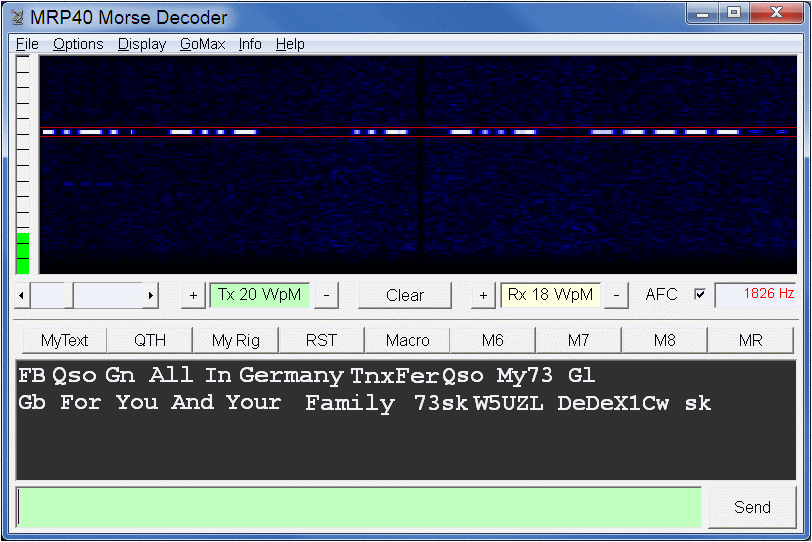
MRP40 Morse Code Decoder & Sender is an advanced software for decoding and transmitting Morse code (CW) via audio.
MRP40 decodes the CW using the computer sound card.
Pros
Very strong decoding on weak signals: when the CW was buried in noise and with some QSB, it gave me a “cleaner” copy than I would normally expect from an audio decoder.
Useful AFC/tracking: with signals that drifted slightly, the AFC helped me stay locked without manually chasing the tone.
Automatic speed recognition: when WPM changed (typical in contests or with different operators), I didn’t have to keep tweaking parameters.
Effective software CW filtering: tightening the filter in software gave me real improvements when there were nearby signals or a bit of band “crud.”
Keyboard TX: the “sender” side is handy for replying by typing, as long as you use an audio chain/interface that makes sense with your radio setup.
Cons
Sometimes outputs “garbage” when idle: when it’s listening to static or unclear signals, it can spit out random characters instead of staying completely “quiet.”
Needs a bit of fine-tuning: until I properly set tone, gain, and signal centering, the error rate went up a lot.
Sensitive to adjacent signals: if two CW signals are very close and the RF/IF filter isn’t tight, it can “hesitate” and decoding gets worse.
Software/packaging can cause friction on modern PCs: I’ve seen reports of antivirus flags or “permission” issues on recent Windows versions; it doesn’t happen to everyone, but it’s a practical risk to consider.
Paid / trial: compared to free alternatives, I mainly consider it worth it if you really need performance on difficult signals.
Practical usage note (what worked for me)
Receiver in CW mode with the narrowest filter possible (first on the radio side, then in software).
Precise tone centering using the spectrum/waterfall, and correct audio level to avoid clipping or levels that are too low.
If there is nearby QRM, what made the difference for me was: a tight filter, a centered tone, and a “clean” audio path (no odd PC-side compression/AGC in the chain).
Instructions in English, German, Japanese.
Let us summarize the functions and features that will be useful in choosing the best program for CW decoding:
Compatibility
The software is compatible with various devices and interfaces, including Winkeyer USB, DigiMaster CW Interface, SignaLink, Rigblaster Advantage, Microham USB Interface II, and microHam microKeyer II. It's also possible to create a galvanically isolated PC-RIG interface.
Performance
Very effective decoding of weak, noisy, and fading signals.
Almost 100% copy in heavy CW contest conditions and local QRM.
Decoding now better than the famous MRP37 Morse Decoder (MS-DOS version, no longer for sale).
Features
- Morse Code Decoding up to 60 WpM.
- Text and Graphic Display.
- High-performance software CW filtering.
- Automatic speed recognition.
- Automatic Gain Control (AGC).
- Automatic tracking of "drifting" signals (via AFC).
- Automatic formatting of received text, correcting unspaced words.
- Beacon transmitting mode.
Transmission Methods
Using AFSK (audio frequency-shift) keying by sending CW audio to the transceiver from the computer's sound card.
Keying the transceiver via the RS232 serial port or sound card output.
Using Winkeyer USB.
System Requirements
Soundcard: any general-purpose sound card.
CPU: Pentium 450 MHz or faster.
Operating Systems: Win95 / Win98 / WinMe / Win2000 / Win XP / Win 7, 8, 10 / Snow Leopard / Parallels Desktop 5.
Additional Functions
MiniLogBook with QRZ.com database lookup.
Improved AFC functions.
Vertical scroll bar in the receive text box.
Adjustable minimum Rx and Tx speed.
Version
MRP40 Version 66: Bug fixes, improvements in transmission and decoding, additional functions like MiniLogBook, and AFC enhancements.

