



cruisingearth - ship traffic tracking: pros and cons
I’ve used CruisingEarth on and off for practical ship-tracking and for “situational awareness” around ports and itineraries. The site is not trying to be a pure AIS map clone; it’s built more like an ecosystem: trackers, port views, webcams, weather, and a community layer in one place. If you already know how AIS-driven tracking behaves in the real world, CruisingEarth feels familiar—useful, fast to navigate, and occasionally limited for reasons that are mostly upstream (coverage, AIS availability, refresh cadence).
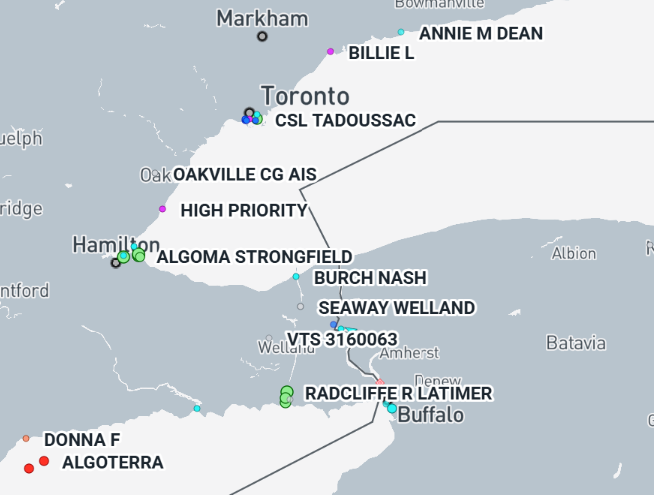
How the site is structured in practice
From a day-to-day user perspective, CruisingEarth breaks down into a few workflows:
1) Track a specific ship quickly
The “Ship Tracker” entry points are optimized for search-first behavior: you type a ship name (or jump by category/line), open the ship page, and you typically get location plus the standard navigation context: speed/course and a route/ETA-style narrative when the feed supports it. It’s the kind of layout that works well when you’re checking on friends/family at sea, or following a repositioning.
2) Use port pages to understand what’s happening locally
Port tracking is where CruisingEarth can be more immediately actionable than “ship-only” maps. If you care about a destination day (or you’re meeting a ship), the port view tends to be the quicker way to answer: “What’s arriving, what’s departing, what’s already in, and what’s the weather doing at the port?”
3) Webcams as a reality check, not as proof
The webcam sections (ship webcams and port/destination webcams) are best treated like contextual validation. If a port cam is live/healthy, it can confirm congestion, visibility, or berth activity. But webcam availability and reliability are inherently variable: some cams refresh periodically, some have downtime, and quality can range widely. When it works, it’s a nice complement; when it doesn’t, it’s not something you should anchor decisions on.
4) Weather as “good enough” planning context
The weather area is clearly designed for travelers rather than meteorology professionals. It’s helpful for quick checks—enough to anticipate disruption patterns—but if conditions are borderline (wind, swell, storm tracks), you’ll still want a dedicated marine weather source.
The single biggest thing to understand: what “missing updates” really mean
CruisingEarth is explicit that its tracking is AIS-based. In real usage, this leads to the same pattern you see across free trackers:
Near coasts and in busy areas, updates can look “continuous enough,” because the ship is within line-of-sight range of terrestrial receivers.
Offshore, especially on long crossings, you can see gaps or stale positions. That is not automatically “the site being wrong”; it’s often coverage economics and radio physics showing up in your UI.
CruisingEarth also discusses the reality that many vessels rely on a mix of terrestrial VHF reception and satellite relays, but free public experiences commonly degrade when ships are far from receivers. The practical implication is simple: interpret continuity as a coverage artifact, not a ship behavior signal.
A second nuance: “military tracking” is a category, not a guarantee. Government/military vessels may not transmit AIS consistently (or at all). When you do see a military vessel displayed, it’s typically because it is broadcasting AIS and the signal is being captured—so treat it as “what’s available,” not “complete operational truth.”
Community rules and what they imply for experienced users
If you plan to use the forum (or post anything public), note that CruisingEarth’s rules are more specific than many casual travel communities. Two points that matter operationally:
Public content is expected to be in English. If you post in another language, it may be removed.
Automation/scraping is not something to do casually. The terms explicitly push back against bots/unauthorized automated access. If you were thinking of building a personal dashboard that pings ship pages, do it carefully and respectfully, or seek explicit permission.
This is consistent with a site that wants to remain usable and moderated, not turned into a free data endpoint.
Privacy/cookies: what to expect
CruisingEarth runs like a modern ad-supported website with analytics. The privacy documentation references analytics and advertising tooling (including Google components), cookie lifetimes, and standard account/data retention concepts. For an experienced user, the takeaway is:
Expect a cookie consent experience (especially as an EU user).
If you care about minimizing tracking, manage consent choices and/or use browser-level privacy controls.
If you create an account for community features, treat it like any forum account: use a dedicated password manager, minimal profile exposure, and assume routine logging/telemetry.
Where CruisingEarth fits well (and where it doesn’t)
It’s strong when you want:
A single place to do ship + port + webcam + basic weather without bouncing between multiple sites.
A travel-oriented interface rather than a purely technical maritime console.
Quick checks and “story of movement” around itineraries.
It’s weaker when you need:
Guaranteed high-frequency offshore updates.
“Compliance-grade” location certainty (e.g., operational decision-making where you’d normally pay for premium feeds).
Webcam reliability as a primary source of truth.
My practical usage tips (experienced-user style)
If a ship looks “stuck,” first ask: Is it far from shore? If yes, assume coverage before assuming a problem.
When timing matters (meeting a ship, port-day coordination), combine port tracker + ship page + weather for triangulation.
Treat webcams as context, not evidence. If the cam is down, move on.
If you post in the community: keep it English, keep it clean, and avoid anything that looks like promotion or affiliate behavior.

