

Malwarebytes – overview, features, strengths and weaknesses
Malwarebytes is a cybersecurity vendor best known for its anti-malware and antivirus solutions. Its flagship product, Malwarebytes Premium, is available for Windows, macOS, Android, and iOS and is positioned as a lightweight, behavior-focused security solution, rather than a full all-in-one security suite.
The software originated as a malware removal tool, and this heritage still strongly influences its current design philosophy and technical strengths.

Product overview
Malwarebytes Premium provides real-time protection against malware, ransomware, spyware, potentially unwanted programs (PUPs), and malicious websites. It is designed to operate with minimal system impact, targeting users who value responsiveness and simplicity.
The product is commonly used either as:
a stand-alone protection tool for basic to intermediate needs, or
a complementary layer alongside another antivirus solution.
Key features
Protection technologies
Real-time threat protection against malware, ransomware, and exploits.
Web protection that blocks malicious and phishing websites.
Behavior-based detection supported by heuristic analysis and machine learning, effective against unknown or zero-day threats.
Scanning capabilities
Quick, custom, and full system scans.
Particularly strong performance in detecting and removing existing infections, including adware and persistent PUPs.
Performance
Generally low CPU and memory usage.
Limited impact on system responsiveness during everyday use.
Scans are typically faster than those of many full security suites.
Usability
Clean, straightforward interface.
Minimal configuration required.
Suitable for non-technical users while remaining practical for advanced users.
Strengths
Excellent malware removal
Malwarebytes is frequently recognized for its ability to remove active and deeply embedded malware that other antivirus products may fail to eliminate.
Lightweight design
A commonly reported advantage is the low impact on system performance, making it suitable for older or less powerful hardware.
Strong PUP and adware detection
The software is particularly effective against adware, browser hijackers, and unwanted software, areas where some traditional antivirus solutions are more permissive.
Competitive pricing
Compared with large security suites, Malwarebytes Premium is often considered reasonably priced for the level of protection it offers.
Weaknesses
Malwarebytes does not include several features commonly found in comprehensive security packages, such as:
This may limit its appeal for users seeking a single, all-inclusive solution.
Average results in traditional antivirus tests
In independent comparative tests, Malwarebytes generally delivers solid but not market-leading detection rates, particularly for classic file-based viruses.
Customer support concerns
Some users report:
Free version limitations
The free edition:
Common use cases
Users who want effective malware cleanup with minimal system load.
Systems already protected by another antivirus, where Malwarebytes acts as a second layer of defense.
Users prioritizing simplicity over extensive feature sets.
Overall assessment
Malwarebytes is a reliable, efficient, and user-friendly security solution, particularly strong in malware removal and protection against modern threats such as ransomware and PUPs. Its lightweight nature and ease of use are widely appreciated.
However, it does not fully replace advanced security suites that include firewall management, identity protection, and system utilities. As a result, it is best suited for users who value performance, clarity, and focused protection, or who plan to use it alongside another antivirus product.
My opinion
The free version does not protect in real time.
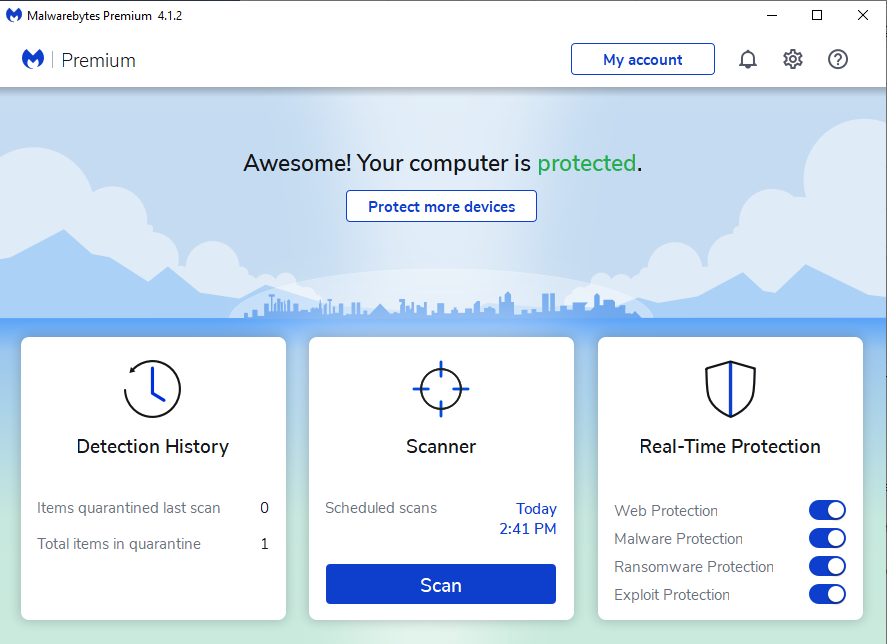
The interface is essential and it looks like this on your computer:

The scan is very fast and reports problems easily and quickly. It is particularly suitable against ransomware and exploits.
There are no problems of conflict with other antivirus, on the other hand it is advisable, for greater protection, to use a traditional antivirus as well. I use the paid version together with Windows Defender.
An interesting peculiarity of Malwarebytes is its defense action against new threats that many other protection software cannot block in time.
Malwarebytes checks all the files on your computer in this way:
and instantly detects any problems.
The full main scan takes between 6 and 7 minutes.
The quick boot RAM scan takes about 30 seconds.
It is possible to perform custom scans only on files or folders.
The paid version instantly blocks URLs, malicious sites and zero-day attacks.
Great product.